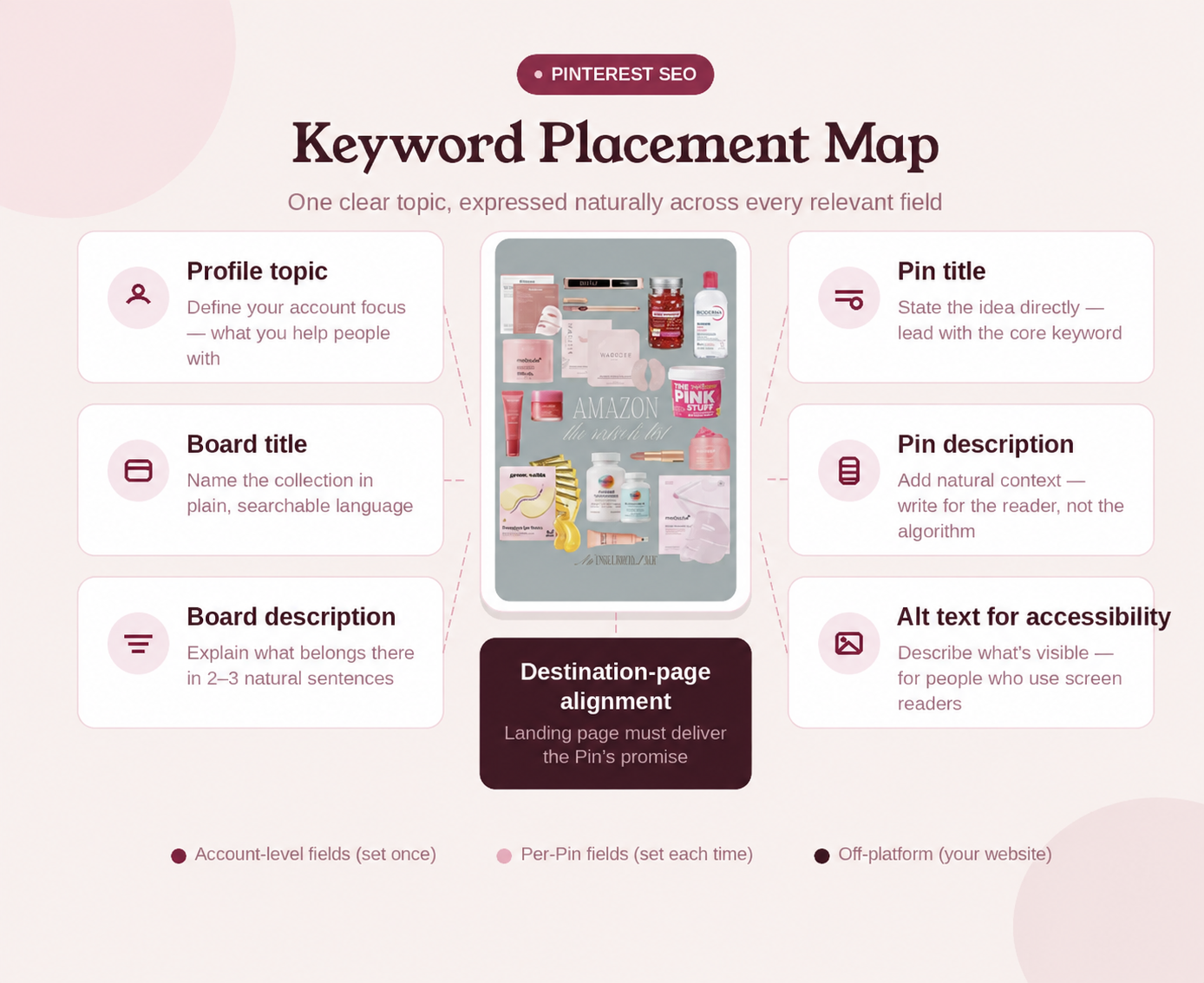
The short answer: where do Pinterest keywords go?
Pinterest's current business guidance recommends using relevant keywords in Pin titles, Pin descriptions, board titles, and board descriptions. It also advises creators to make sure a Pin's images, text, keywords, and landing-page details match.
The practical priority is straightforward: name the idea in the Pin title, explain it in the Pin description, save it to a clearly named board, and continue the same promise on the destination page. Your profile can explain the subjects your account covers. Alt text has a separate accessibility purpose: describing what is visible for people who use screen readers.
Pinterest does not publish a guaranteed keyword density or an exact formula for ranking. Use each field for its real purpose instead of forcing the same phrase into every available box. The goal is a consistent, useful idea—not maximum repetition.
- Pin title: name the idea clearly.
- Pin description: explain what the person will find or learn.
- Board title and description: define the larger topic that contains the Pin.
- Destination page: continue the topic and fulfill the Pin's promise.
- Profile description: explain the main subjects your account covers.
- Alt text: describe the visible image for people using screen readers.
Read Pinterest's current Pin performance and distribution guidance
How to choose a useful Pinterest keyword
You do not need a complex tool to choose the first phrase. Begin with the content and the decision the reader is trying to make.
Define the actual topic
Write one sentence describing what the Pin leads to. ‘A guide to growing basil, mint, and rosemary on a narrow apartment balcony’ is more useful than ‘garden inspiration.’ The narrower sentence reveals the important nouns, audience, and situation.
Match the reader's intent
Similar phrases may answer different needs. ‘Balcony herb garden ideas’ suggests inspiration, ‘how to start a balcony herb garden’ suggests instructions, and ‘best herbs for an apartment balcony’ suggests selection. Choose the phrase that matches the destination page. An instructional title should lead to instructions, not a thin product grid.
Check Pinterest's own language
Use Pinterest search suggestions and relevant results as clues about how people describe the topic. Treat those clues as research, not permission to copy another creator's wording. Pinterest Trends can provide another signal when it is available for your market and topic.
Choose one primary phrase
Pick one phrase that accurately summarizes the Pin. Add closely related language only when it makes the copy clearer. You do not need to fit every variation into one Pin.
Confirm destination alignment
Open the destination before finalizing the copy. Its page title, main heading, visible content, product details, and the Pin's promise should agree. Pinterest specifically recommends checking that Pin images, text, keywords, and landing-page details match.
How to add keywords to each Pinterest field
Each Pinterest field has a different job. Write for that job first; then include the topic where it fits naturally.
Pin title
Put the clearest version of the idea near the beginning. Pinterest's current Pin specifications permit titles up to 100 characters, but you do not need to fill the limit. ‘Small Balcony Herb Garden for Beginners’ identifies the subject and audience without turning the title into a list of variants.
Readable alternatives include ‘Neutral Home Office Ideas for a Small Room’ and ‘Easy Watercolor Supplies for Your First Painting.’ Avoid titles made entirely from phrases separated by commas or vertical bars. They are harder to scan and usually communicate less.
Pin description
Use the description to add context the title cannot carry. Pinterest currently permits descriptions up to 800 characters and recommends entering a description to help its systems understand relevance.
A practical description explains what the Pin covers, who or what situation it is for, and what someone will find after clicking. For example: ‘Start a small balcony herb garden with beginner-friendly containers, sun-loving herbs, and a simple watering routine for compact apartment spaces.’ The phrase appears once because it is the subject; the rest adds meaning.
Board title and description
Save the Pin to the most relevant public board. ‘Small-Space Gardening’ is more descriptive than ‘Things I Like.’ Do not create a nearly identical board for every keyword variation; a board should support a coherent collection that a person can browse.
Describe the board in one or two natural sentences, such as: ‘Practical container gardening ideas for balconies, patios, and compact apartment spaces, including beginner herbs and low-maintenance planting tips.’ Pinterest's business guidance recommends proper board titles and descriptions because boards can also be discovered in search.
Profile name and description
Use your profile to tell visitors what your account consistently covers. If your content focuses on small-space gardening, say that plainly. Do not change the profile for every new Pin, and do not claim that placing a phrase there has a known ranking weight—Pinterest does not publish one. Human clarity is the reason to write this field well.
Alt text
Alt text explains what people can see in the Pin. Pinterest says it supports people who rely on screen readers and currently allows up to 500 characters.
Describe the visible arrangement, objects, actions, and meaningful on-image text. Do not paste the Pin description into alt text or repeat variants that are not needed to describe the image. A topic phrase can appear when it accurately describes the visual, but accessibility remains the purpose.
Destination page
The destination should continue the same subject in visible, useful content. A Pin called ‘Small Balcony Herb Garden for Beginners’ should lead to a page that actually helps a beginner plan or start that garden. Check the final URL, page title, main heading, images, product availability, and claims before publishing. Keywords cannot repair a broken link or mismatched destination.
A complete keyword workflow for one Pin
Use this repeatable process instead of editing fields independently. It keeps the search language connected to the actual creative and destination.
Start with the destination
Review the page you plan to link. Identify its main promise and the most specific audience or use case it serves.
Write the primary phrase
Summarize that promise in a phrase a person could understand without context. For this example, use ‘small balcony herb garden.’
Draft the Pin title
Turn the phrase into a readable headline: ‘Small Balcony Herb Garden for Beginners.’ Keep it accurate and easy to scan on mobile.
Add useful description context
Explain what the page contains: containers, suitable herbs, sunlight, and watering. Do not repeat the title as a second sentence.
Choose the right board
Use a board whose title and description already fit the topic, such as ‘Small-Space Gardening.’ Create a new board only when you expect to build a meaningful collection around that subject.
Describe the image
Write alt text from the visual itself. Mention the arrangement, objects, actions, and important visible text when relevant.
Compare every field with the destination
Check whether the title, description, board, image, alt text, and page tell one consistent story. Correct mismatches before publishing.
Review performance without rewriting blindly
Use Pin stats and Pinterest Analytics where available to understand saves, outbound clicks, and engagement. A weak result does not prove one keyword is wrong. Creative quality, topic demand, timing, destination quality, account history, and other factors can affect distribution.
See Pinterest's guidance for preparing Pins and boards for search
Natural Pinterest keyword examples
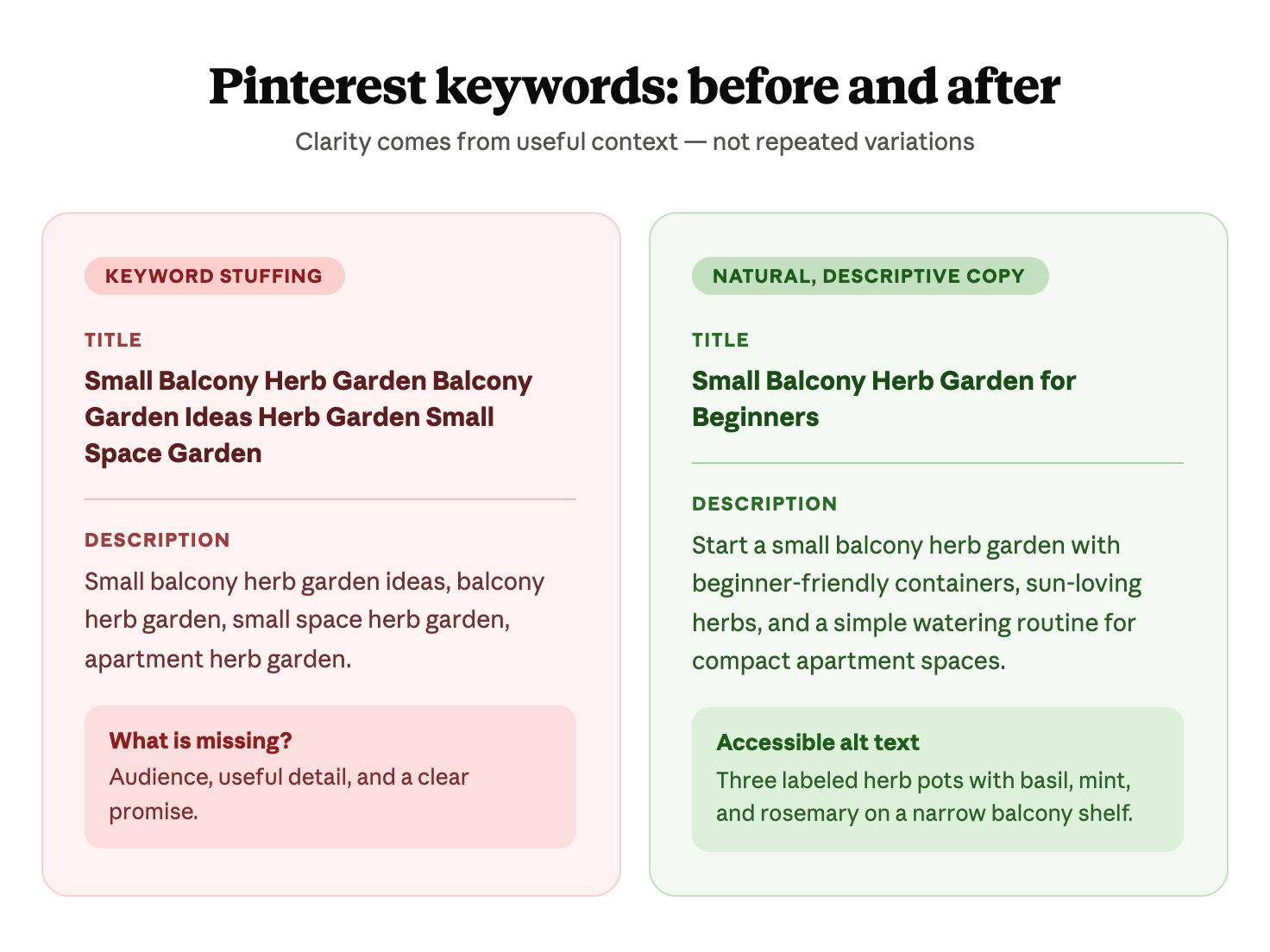
Keyword stuffing adds variations without adding meaning. Natural optimization gives each field a specific job.
Stuffed title: Small Balcony Herb Garden Balcony Garden Ideas Herb Garden Small Space Garden
Natural title: Small Balcony Herb Garden for Beginners
Stuffed description: Small balcony herb garden ideas, balcony herb garden, small space herb garden, apartment herb garden.
Natural description: Start a small balcony herb garden with beginner-friendly containers, sun-loving herbs, and a simple watering routine for compact apartment spaces.
Accessible alt text: Three labeled herb pots with basil, mint, and rosemary arranged on a narrow apartment balcony shelf.
The natural set is easier to read, gives the beginner useful context, and accurately describes the destination and image. That makes it a stronger publishing package. It does not guarantee that Pinterest will rank or distribute the Pin.
How PinGlaze helps you prepare the publishing copy
You can follow this workflow manually. PinGlaze is an optional way to keep the editable visual, Pin title, description, and alt-text draft together while preparing the Pin.
Start with a product or destination link, choose a suitable Pinterest template, and generate a working package. Then edit every field so it matches the actual page. Generated wording is a draft—not evidence that a phrase is accurate, popular, or guaranteed to perform.
PinGlaze currently helps you create, edit, save, and download the Pin package. It does not publish or schedule the Pin to Pinterest. Review the final link and copy before uploading them yourself.
- Choose an editable visual instead of starting from a blank canvas.
- Prepare a Pin title and description draft in the same workflow.
- Add accessible alt text, then review it against the final image.
- Save your working package and download the approved assets.
For more context, see the Pinterest Pin generator guide or browse the template library before creating your publishing package.
Common Pinterest keyword mistakes
Most keyword problems come from treating fields as containers to fill rather than parts of one useful publishing package.
- Repeating the same phrase in every sentence without adding information.
- Using an unrelated high-volume phrase that does not match the Pin or destination.
- Treating alt text as hidden SEO copy instead of describing the image.
- Saving the Pin to a vague or irrelevant board.
- Writing a title but leaving the description empty.
- Creating thin boards for minor keyword variants.
- Copying search suggestions mechanically instead of writing original copy.
- Ignoring a broken link, expired detail, or mismatched destination page.
- Assuming a fixed keyword count guarantees reach.
- Editing every field after one weak result without reviewing the complete creative.
Correct these mistakes by returning to the reader's need and the destination's real promise. Clear wording and accurate alignment are useful even when no ranking outcome is guaranteed.
Pinterest keyword checklist before publishing
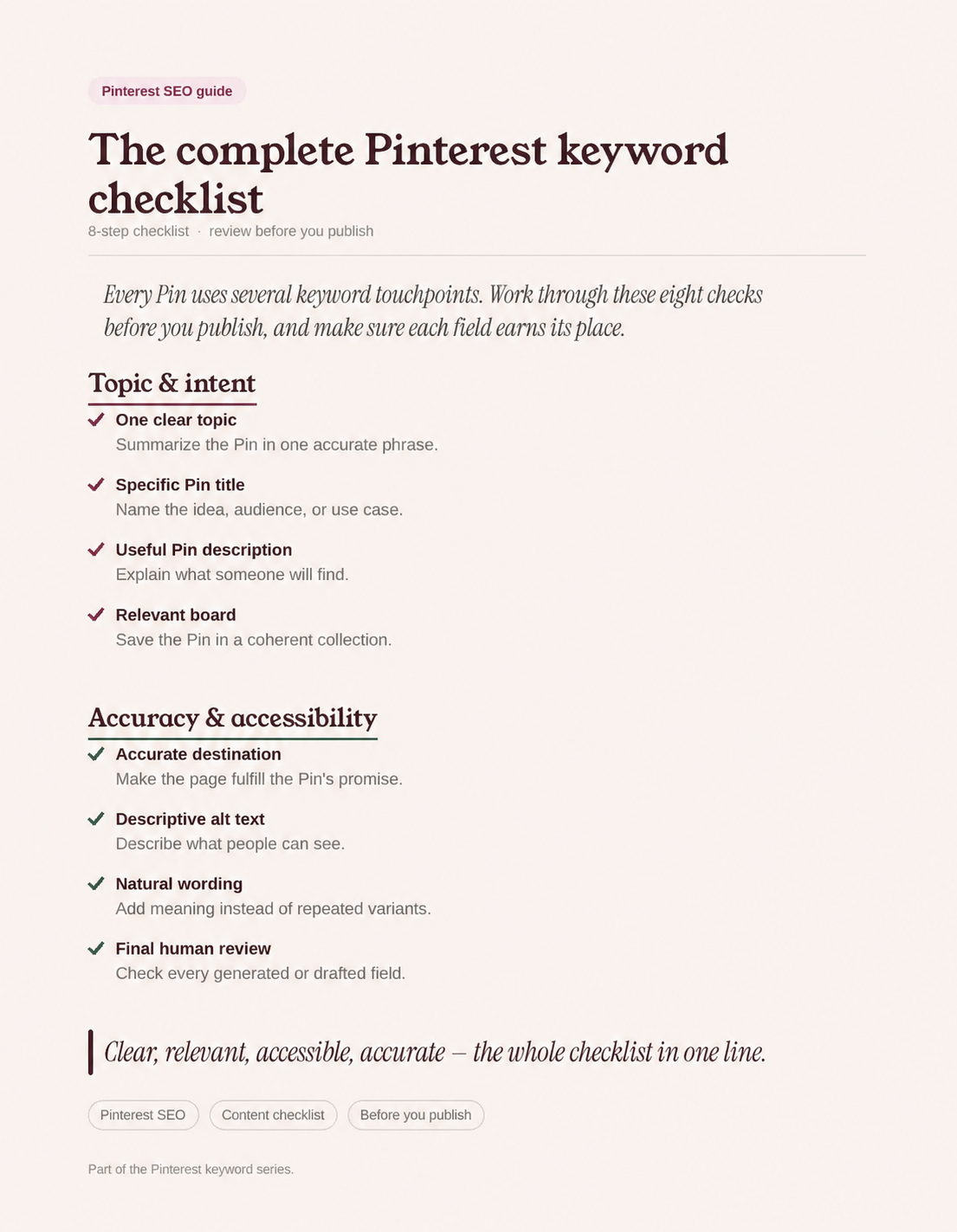
Run this checklist after the visual and destination are final. Each field should add useful context instead of merely repeating the previous one.
Topic and intent
A clear topic keeps the title, description, image, and page aligned.
- Summarize the Pin in one accurate phrase.
- Confirm the phrase matches what the destination provides.
- Identify whether the intent is inspirational, instructional, comparative, or transactional.
Pinterest fields
Give each field a distinct, useful role.
- Make the Pin title specific and readable.
- Use the description to explain what someone will find.
- Save the Pin to a relevant board with an accurate description.
- Keep the profile description focused on the account's real topic.
Accessibility and accuracy
A trustworthy publishing package must remain accessible and match its destination.
- Describe what is visible in the alt text.
- Test the final URL and confirm the image, copy, and page agree.
- Remove unsupported claims and expired details.
- Have a person review generated or drafted copy before publishing.
Frequently asked questions
Where should I put keywords on Pinterest?
Use relevant language in the Pin title, Pin description, board title, and board description. Your profile description can explain your account's topic, while the destination page should fulfill the same promise. Write alt text to describe the image for accessibility.
How many keywords should I use on a Pinterest Pin?
Pinterest does not publish a guaranteed keyword count or density. Start with one clear primary phrase and use related language only when it adds useful context. A readable title and description are more helpful than a list of variants.
Are Pinterest keywords the same as hashtags?
No. Keywords are the natural words and phrases that describe the idea throughout your Pin and related context. Hashtags begin with #, while topic tags may appear as separate publishing options; neither replaces a clear title and description.
Should I add keywords to Pinterest alt text?
Write alt text for people who use screen readers by describing what is visible in the image. A relevant topic phrase can appear when it accurately describes the visual, but do not stuff keyword variations into alt text.
Can I add keywords to an existing Pin?
Pinterest provides editing options for owned Pins, although available fields and steps can vary by account type, Pin format, device, and current interface. Improve accuracy and clarity rather than repeatedly changing fields in pursuit of a promised ranking result.
Do Pinterest keywords guarantee more traffic?
No. Relevant wording helps Pinterest and people understand your content, but it cannot guarantee distribution, clicks, or traffic. Topic demand, creative quality, saves, destination relevance, timing, and other factors also influence results.
Prepare clear Pinterest publishing copy
Keep every field clear, accessible, and aligned with the destination. Create an editable Pin package, then review the title, description, alt text, and final link before publishing.